Don't Buy the Ecotank Et 3850 Until You Read This Full Analysis
Introduction
The landscape of home office printing has undergone a radical transformation over the last decade. For years, the industry followed a "razor and blade" business model: sell the hardware at a loss or at a very low margin, and then recoup the costs through high-priced ink cartridges. This cycle often led to consumer frustration, as a single set of replacement cartridges could sometimes cost as much as the printer itself. However, the introduction of high-capacity ink tank systems, specifically the Epson EcoTank series, challenged this paradigm. Among the most popular mid-range offerings in this line is the EcoTank ET-3850.
While the marketing for the ET-3850 promises thousands of pages of prints from a single set of bottles and significant savings over traditional cartridges, the initial investment is considerably higher than that of a standard inkjet printer. This creates a dilemma for the modern consumer: is the upfront cost justified by the long-term savings, or are there hidden compromises in performance, build quality, and features that make the ET-3850 a less-than-ideal choice for certain users? This analysis delves deep into the specifications, real-world utility, and economic viability of the ET-3850 to determine who should invest and who should look elsewhere.
In this editorial review, the focus is not merely on the tech specs found on a box, but on how this machine fits into the daily life of a busy student, a remote worker, or a small business owner. We will examine the printer's output quality, the ergonomics of its design, and the actual mechanics of its centerpiece—the PrecisionCore heat-free technology. Understanding these elements is crucial before committing to a device that is designed to stay on your desk for years to come.
Detailed Product Analysis
The Core Technology: PrecisionCore and Heat-Free Design
At the heart of the EcoTank ET-3850 is Epson's proprietary PrecisionCore printhead technology. Unlike many competitors that use thermal inkjet processes—which rely on heat to boil the ink and force it through the nozzles—the ET-3850 uses piezoelectric elements. When an electric charge is applied to these elements, they change shape and mechanically eject the ink. This "heat-free" approach is more than just a marketing buzzword; it has tangible benefits for the longevity of the printhead and the speed of the first page out. Because there is no warm-up time required for the printhead to reach operating temperature, the printer can transition from a sleep state to active printing almost instantly.
Furthermore, the exclusion of heat means the printhead is less prone to degradation over time compared to thermal alternatives. This is a critical factor for a tank printer, as the entire value proposition depends on the machine lasting long enough for the ink savings to surpass the initial purchase price. If the printhead fails after two years of heavy use, the "unlimited ink" benefit becomes moot.
Design and Build Quality
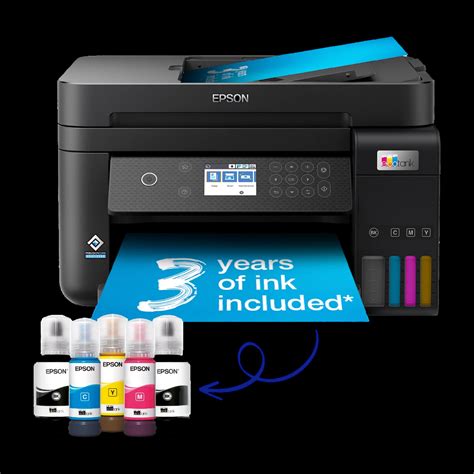
The ET-3850 is remarkably compact considering it houses four large ink reservoirs. Epson has moved away from the early "bolt-on" tank designs seen in first-generation EcoTanks, opting for integrated front-facing tanks. This allows users to monitor ink levels at a glance without having to open the machine. The build quality is consistent with mid-range office equipment; it is primarily high-grade plastic, which keeps the weight manageable while maintaining a footprint small enough for most standard desks or bookshelves.
One notable design choice is the 2.4-inch color display. While it is not a touchscreen—users must navigate menus using a physical directional pad—it provides clear instructions and status updates. While some might find the lack of a touch interface dated, physical buttons often prove more durable in a dusty office environment and are less prone to accidental inputs. The paper handling is facilitated by a 250-sheet front-loading tray, which is a significant upgrade over the rear-feed trays found on cheaper models, as it protects the paper from dust and allows the printer to be tucked into tighter spaces.
Performance: Speed and Quality
In terms of speed, the ET-3850 is rated at 15.5 pages per minute (ppm) for black and white and 8.5 ppm for color. In real-world testing, these figures hold up reasonably well for standard text documents. It is not as fast as a dedicated office laser printer, but for a home office handling moderate volume, it rarely feels sluggish. The printing of high-resolution color photos or complex graphics naturally slows the process down, but the results are generally impressive for a non-photo-centric printer.
The ink used in the ET-3850 is a hybrid set: pigment Black (127) and dye-based Color (502). This is a strategic choice. Pigment ink for black text ensures that documents are smudge-resistant, highlighter-friendly, and deliver sharp, crisp characters that resemble laser quality. The dye-based color inks are better suited for blending and providing vibrant hues on various paper types. However, users should be aware that because the colors are dye-based, they are not as resistant to fading or water as a fully pigment-based system would be. For standard business reports and school projects, this is rarely an issue, but for archival-grade photo printing, one might consider Epson’s higher-end "Photo" EcoTank models.
Looking for the best Electronics deals on Amazon?
Browse Now →Connectivity and Software
Connectivity is a strong suit for the ET-3850. It supports Wi-Fi, Wi-Fi Direct, and Ethernet, making it easy to integrate into a wired or wireless network. The Epson Smart Panel app is a highlight of the user experience. It transforms a smartphone into a control center, allowing users to print, scan, and perform maintenance tasks such as nozzle checks directly from their mobile device. For those who frequently work from tablets or phones, the seamless integration with Apple AirPrint and Mopria Print Service is a welcome convenience.
The Scanning and Copying Experience
Equipped with a 30-sheet Automatic Document Feeder (ADF), the ET-3850 is designed to handle multi-page scanning and copying tasks with ease. It is important to note, however, that the ADF on this specific model is not auto-duplexing for scanning. While the printer can print on both sides of the paper automatically (auto-duplex printing), it cannot scan both sides of a document automatically. For a user who regularly needs to digitize double-sided contracts, this may be a significant hurdle, as it requires manual flipping or software-level intervention.
Comparison with Segment Rivals
To understand the ET-3850's value, it is helpful to see how it stacks up against its siblings and primary competitors in the "Super Tank" category.
| Feature | Epson ET-3850 | Epson ET-2850 | HP Smart Tank 7301 | Canon G7020 |
|---|---|---|---|---|
| Print Speed (Black/Color) | 15.5 / 8.5 ppm | 10.5 / 5.0 ppm | 15 / 9 ppm | 13 / 6.8 ppm |
| Paper Capacity | 250 Sheets | 100 Sheets | 250 Sheets | 350 Sheets (Dual Feed) |
| Auto Document Feeder | Yes (30 Sheets) | No | Yes (35 Sheets) | Yes (35 Sheets) |
| Auto Duplex Printing | Yes | Yes | Yes | Yes |
| Ink Technology | Pigment Black / Dye Color | Pigment Black / Dye Color | Pigment Black / Dye Color | Pigment Black / Dye Color |
| Display | 2.4" Color LCD | 1.44" Color LCD | Tilted Mono LCD | 2-Line Mono LCD |
Pros and Cons Analysis
Every piece of technology involves trade-offs. The ET-3850 excels in economy and text clarity but has limitations in specific workflow areas. Below is a breakdown of the advantages and disadvantages discovered during our analysis.
- Significant Ink Savings: The primary reason to buy this printer is the cost per page. A single set of replacement bottles can print up to 7,500 pages in black and 6,000 in color. This reduces the cost per page to a fraction of a cent, compared to several cents for traditional cartridges.
- Pigment Black Ink: The use of pigment black ink ensures that business documents are professional-looking, with deep blacks that do not bleed into the paper fibers or smear when touched by a highlighter.
- Reliable Paper Handling: The 250-sheet cassette is fully enclosed, which prevents dust from accumulating on the paper—a common cause of paper jams in cheaper models with open rear trays.
- PrecisionCore Durability: The heat-free printhead is designed for the long haul, reducing the likelihood of hardware failure before the ink tanks are even depleted.
- Compact Footprint: Despite its capacity, the printer is designed with space efficiency in mind, making it suitable for home offices where surface area is at a premium.
- Excellent Mobile App: The Epson Smart Panel app is one of the most intuitive in the industry, simplifying setup and ongoing maintenance.
- High Initial Price: The upfront cost is significantly higher than a comparable cartridge-based printer. Users who print fewer than 50 pages a month may find that it takes several years to reach the "break-even" point.
- Lacks Duplex Scanning: While it can print on both sides, the ADF is simplex-only. This means users must manually flip double-sided documents for scanning or copying.
- Small Navigation Screen: The 2.4-inch screen is clear but small, and the lack of touch controls can make entering complex Wi-Fi passwords a tedious chore.
- No Secondary Paper Feed: Unlike some competitors, there is no dedicated rear slot for envelopes or specialty heavy cardstock, meaning you have to empty the main tray to switch media types.
- Dye-Based Colors: While vibrant, the color inks are not water-resistant. If a color-printed document gets wet, the inks will run.
Real-World Use Cases
The Remote Professional
For individuals working from home, the ET-3850 serves as a reliable workhorse. Consider a freelance accountant or a legal assistant who regularly prints 20 to 50 pages of documentation daily. With a traditional printer, they would be changing cartridges every few weeks. With the ET-3850, they can go over a year without even thinking about ink. The crispness of the pigment black ink ensures that contracts and ledgers look professional when mailed to clients.
The Busy Student
College students often have to print long research papers, study guides, and lecture slides. The ability to print in full color without worrying about the cost is a massive psychological benefit. Students can print graphics-heavy slides or academic posters with the same freedom they would have with simple text. The small footprint also makes it ideal for a dorm room desk where space is shared with laptops and textbooks.
The Small Business Owner
Small retail shops or local service providers can use the ET-3850 for packing slips, invoices, and basic marketing flyers. The Ethernet port allows for a stable connection in an environment where Wi-Fi might be congested. However, if that business frequently scans double-sided IDs or insurance forms, the lack of duplex scanning might become a bottleneck in their workflow.
Buying Guide: Is the ET-3850 Right for You?
When deciding whether to purchase the EcoTank ET-3850, it is essential to calculate your "Total Cost of Ownership" (TCO) rather than just looking at the sticker price. Most buyers fall into one of three categories.
Shop the latest Electronics picks on Amazon.
View Offers →The High-Volume User
If you print more than 150 pages per month, the ET-3850 is a clear winner. The savings on ink will likely pay for the difference in hardware cost compared to a cheaper printer within 12 to 18 months. Beyond that point, you are essentially printing "for free" in terms of relative savings. For this user, the reliability of the PrecisionCore head and the large paper tray are essential features that justify the investment.
The Occasional User
If you print only a few pages a month—perhaps a return label or a boarding pass once every two weeks—you might want to reconsider. Inkjet printers, including EcoTanks, can suffer from clogged nozzles if they sit idle for long periods. While the heat-free technology helps, the ink in the tubes can still dry out. More importantly, it will take years to see any financial return on the expensive hardware. An entry-level laser printer, which uses toner that doesn't dry out, might be a more sensible choice for low-volume needs.
The Creative or Photographer
While the ET-3850 produces very respectable color prints, it is firmly a "business" machine. If your primary goal is printing high-fidelity photography on glossy paper for gallery display, the four-color ink system (CMYK) will lack the depth and tonal range provided by six-color or eight-color photo printers. Creative users should look toward the EcoTank Photo line (like the ET-8500), which uses additional ink types to achieve smoother gradients and deeper blacks in photos.
Key Considerations Before You Buy
- Workforce Volume: Evaluate if the 15.5 ppm speed is sufficient for your needs. If multiple people are sending large jobs at the same time, a higher-end office model or a laser printer might be necessary.
- Scanning Needs: Honestly assess how often you scan double-sided documents. If it's a daily occurrence, the manual labor of flipping pages for the ET-3850 will quickly become frustrating.
- Space Constraints: Measure your desk. While compact, the ET-3850 requires space in front for the paper tray and above for the ADF lid to open.
Conclusion
The Epson EcoTank ET-3850 is a sophisticated evolution of the ink-tank concept, striking a deliberate balance between home-office utility and extreme cost efficiency. It successfully addresses the "cartridge anxiety" that has plagued inkjet users for decades, offering a robust platform that delivers sharp text and vibrant color for a fraction of traditional operating costs. Its inclusion of a 250-sheet tray and an automatic document feeder makes it a competent mid-range multi-function device that can handle the rigors of a productive household or small office.
However, it is not a universal solution. The high initial price point demands a commitment to volume to see a return on investment. The omission of duplex scanning is a notable "missing link" for those who are heavily focused on paperless workflows and document digitization. Furthermore, those with very low printing needs might find the maintenance requirements of an inkjet more burdensome than a simple monochrome laser printer.
Ultimately, if your goal is to stop worrying about the cost of ink and you need a reliable, high-capacity machine for documents, reports, and schoolwork, the ET-3850 is one of the most logical choices on the market. It represents a shift from "disposable" hardware to a long-term office asset. For the right user, the ET-3850 is not just a printer; it is a smart financial decision that simplifies the daily task of getting information from the digital world onto the physical page.